You can find the latest version of the Solution 4000 attached at the bottom of this article, or on their product page under the 'Downloads' section.
Keenfinity | Solution 4000 Control Panel
The same firmware update process applies using the IUI-SOL-ADAPTER, however for this update we also recommend the use of the new 'migrate' function through A-Link+. New locations and features added in the update may not populate to their correct default values if the migrate function, or a panel default, isn't performed.
The article linked below has some more information on updating to the latest version of A-Link+.
Latest release A-Link Plus software V6.3.11 29/05/2026
A-Link+ Migrate
The migrate function copies an existing panel profile to the latest firmware, and populates new locations to their correct default values.
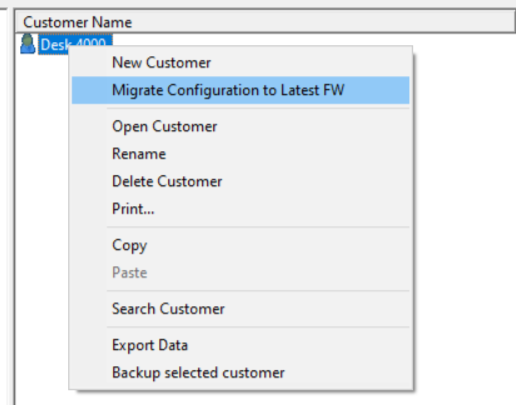
From the customer selection screen, right click the profile you want to migrate and select 'Migrate Configuration to Latest FW'. This will create another customer profile with the same programming on the latest firmware version. Ensure the profile you migrate is up-to-date with what's currently programmed on the panel.
Once you've updated the panel, connect using the new profile and select 'Send A-Link+ Data to Panel'.
Summary of Changes
Please see the attached 'RLN_Solution 4000_V01' document for full backlog and new programming locations.
- Panel Configuration and Diagnostics
Support to check the panel status and do quick configuration via B426-M webpage.
- Zone Inverting
Enables inverting of zone logic for easily integration of normally open devices.
- Installer Sub-Menu
With the codepad IUI-SOL-TEXT, now the installers can use the sub-menu:
– [1][2][4] IP address to inquire IP address of B426-M/B450-M module
– [2][4][4] User card to add or delete user cards
– [2][4][5] Door assign to assign door(s) to the user. Each user can be assigned up to 4 doors, and the user can control the assigned doors in the same area.
- User Sub-Menu
With the codepad IUI-SOL-TEXT, now the Master Code users can use the sub-menu:
– [1][2][4] IP address to inquire IP address of B426-M/B450-M module
– [1][8] Door control to operate door commands
– [2][4][4] User card to add or delete user cards
– [2][4][5] Door assign to assign door(s) to the user. Each user can be assigned up to 4 doors, and the user can control the assigned doors in the same area.
- Card Type
MIFARE 32-bit card is available to operate all door functions.
- Remote Output Mode
With the defaulted Direct Mode setting in the Location 772, now you can control the output remotely with any event codes, regardless if they are Remote control output 1 to 34 or not.
- Speaker Beep for Arming and Disarming
Once the speaker beep is enabled in the Location 773, the siren will beep as indication when the system is armed or disarmed.
- Codepad Volume
Codepad volume is now adjustable on a scale of 0 - 7 for each individual codepad.
- Codepad Backlight
Codepad dim mode can dim the lighting on the display and keys whilst idle.
- APP Updates
Updated operations and UI for this control panel firmware version
– System information inquiry
– Date / Time setting
– Panic alarm triggering
Was this article helpful?
That’s Great!
Thank you for your feedback
Sorry! We couldn't be helpful
Thank you for your feedback
Feedback sent
We appreciate your effort and will try to fix the article