Some installers may encounter the issue "they cannot use RSC+ app to connect to the panel when Cloud ID is Online".
Please use A-Link Plus software to connect to the panel and check below settings:
Network module programming -> Module 1# -> Basic Network Settings -> TCP Connections Enable
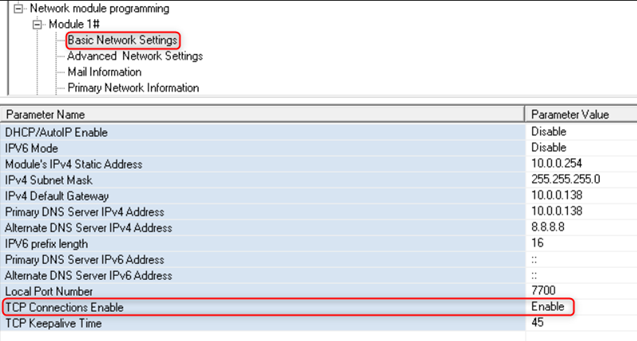
Please DO NOT SET "TCP Connections Enable" to "Enable". Please keep it as the Default setting "Disable".
If the installer does not have A-link plus, they can do it on the codepad:
TCP Connections Enable in A-link plus is locations 4414 and 4415
Enable: 4414 = 0, 4415 =1
Disable: 4414 = 0, 4415 = 0
For module 2, locations 7414 and 7415
Was this article helpful?
That’s Great!
Thank you for your feedback
Sorry! We couldn't be helpful
Thank you for your feedback
Feedback sent
We appreciate your effort and will try to fix the article